The platform is running low on available key-bindings. So, we've decided to add one final key-binding for the debugger's terminate action. The action has been mapped to "CTRL-F2". If you can figure out how to use the key binding preference page, feel free to change it.
We've also fixed a small bug in the Debug view context menu. Key-bindings are once again displayed for the standard step commands in the context menu (when you are debugging). During 3.2, the actions were all changed from view contributions to being contributed by actual code. When we did this, we forgot to assign action definition id's in the code. Woops. Fixed now.
Monday, September 25, 2006


Tuesday, September 19, 2006
Painfully Fast (Now)
Today the debug team revels in its own greatness...Ok we didn't actually fix anything, but we did find out that a bug that was a critical stop ship for us was not at all our fault AND someone had already fixed it (I love those ones).
The bug in question is https://bugs.eclipse.org/bugs/show_bug.cgi?id=153458, and long story short, has to do with the apparent 'extreme slow down' of the eclipse debuger. It turns out (as the previous comment dictates) that it was not our fault; it was really a combination of factors...but mainly the new conjestion algorithm in the newer Linux kernels (> 2.6.14). Luckily though the kernel champions jumped on it and bullied Sun into fixing the way jvms communicate over TCP/IP.
To summarize:
If you have a newer Linux kernel (> 2.6.14) and you are NOT using jdk 1.5.08 or jdk 1.6 r79 you are boned, and doomed to have a matrix-neo-style debugging experience.
The bug in question is https://bugs.eclipse.org/bugs/show_bug.cgi?id=153458, and long story short, has to do with the apparent 'extreme slow down' of the eclipse debuger. It turns out (as the previous comment dictates) that it was not our fault; it was really a combination of factors...but mainly the new conjestion algorithm in the newer Linux kernels (> 2.6.14). Luckily though the kernel champions jumped on it and bullied Sun into fixing the way jvms communicate over TCP/IP.
To summarize:
If you have a newer Linux kernel (> 2.6.14) and you are NOT using jdk 1.5.08 or jdk 1.6 r79 you are boned, and doomed to have a matrix-neo-style debugging experience.
Tuesday, August 29, 2006
A Whole Lotta' Instances
A first draft of another one of the new Java SE 1.6 features is out and ready to be played with. Much like the other feature (All References), All Instances works in pretty much the same way. You can right-click on a variable and select the All Instances... menu item, and before you know it WHAM, you see a popup showing you all of the instances of the selected object in the current VM. Isn't that dandy.
Much like it's companion All References, you of course need a Java SE 1.6 VM to use this feature, and you must be debugging at the time (i.e. have variables in the variables view). There are plans in the mix to expand its availabilty to the Outline View and to a context menu in the java editor....we shall see.
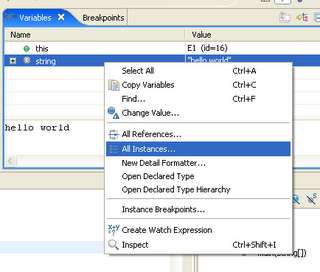
The first image below shows the location of the new action, and in this case we have selected a string, which will result in a popup showing all of the instances of type String in the current VM.
Much like it's companion All References, you of course need a Java SE 1.6 VM to use this feature, and you must be debugging at the time (i.e. have variables in the variables view). There are plans in the mix to expand its availabilty to the Outline View and to a context menu in the java editor....we shall see.
The first image below shows the location of the new action, and in this case we have selected a string, which will result in a popup showing all of the instances of type String in the current VM.
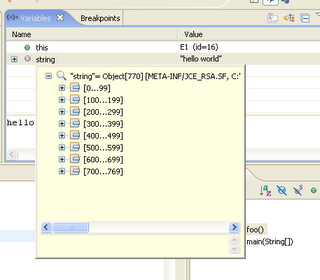
This next image shows the resulting popup (yes it is the inspect popup) telling us that there are 769 instances of String in the current VM. Allow me to say again, dandy.
To try out this...dare I say again...dandy new feature, you will have to wait until the next build or grab the source from HEAD.
Wednesday, August 09, 2006
Browse All References (J2SE 6 only)
If you're running your Java application with a J2SE 6 virtual machine, you can browse all references to an object in the variables view. Select any object in the variables view, and choose All References from the context menu. A pop-up displays all objects referring to the selected object. You can expand each node in the tree to follow references to each object. You can inspect any object in the reference tree by selecting it and pressing Ctrl+Shift+I. This opens an inspect pop-up displaying the object's fields.
This feature is available in the latest integration build and forthcoming 3.3M1 build. It's our first cut of the feature, so feedback and comments are welcome.

This feature is available in the latest integration build and forthcoming 3.3M1 build. It's our first cut of the feature, so feedback and comments are welcome.

Subscribe to:
Posts (Atom)