Are you one of those people that just has to have everything just so? even to the point of having your collection type variables show exactly how you want them? Well if you are you no longer have to fear losing all of those custom logical structures you speant so many hours making.
You can now export and import Java logical structure preferences separate from other workspace preferences. Java logical structures are defined on the Java > Debug > Logical Structures preference page.
This is a cool feature...but not quite axesome.
Friday, March 30, 2007


Hyperlink Debugging
I know I have been silent for qute some time, so I figured it was time to come back to the blogosphere and drop some more knowledge. This time (nothing like that breakpoints post) we have an axesome new feature which is proving to be far more handy than any of us could have really imagined (except Darin of course because he knows everything); Hyperlink Debugging.
The idea behind hyperlink debugging follows that useful feature that pretty much everyone already knows about: hyperlink open declaration (Ctrl+Click in editors open declarations). Except in our case you can do lightning fast step-into operations with but the press of Ctrl+Alt and a click of the mouse....not impressed yet? check out the example.
Lets say you wanted to step into the createComposite method shown below:
SWTFactory.createComposite(getParent(), mainComp.getFont(), getStyle(), getFill());
The old way, you would have to step into and out of all of the method calls in the createComposite method prior to stepping into the one you wanted. You could of course use the old passe method of step into selection...but just imaging being able to step into creatComposite with a single click...no more selecting code, no more repetitious step into/out of code.
You can even select what keys to use as modifiers (thanks to the jdt UI guys of course).
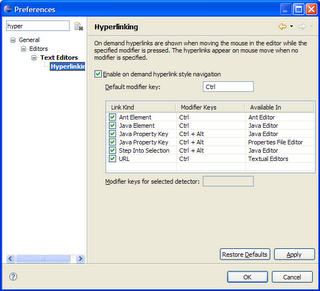
I know what you are thinking....Axesome.
The idea behind hyperlink debugging follows that useful feature that pretty much everyone already knows about: hyperlink open declaration (Ctrl+Click in editors open declarations). Except in our case you can do lightning fast step-into operations with but the press of Ctrl+Alt and a click of the mouse....not impressed yet? check out the example.
Lets say you wanted to step into the createComposite method shown below:
SWTFactory.createComposite(getParent(), mainComp.getFont(), getStyle(), getFill());
The old way, you would have to step into and out of all of the method calls in the createComposite method prior to stepping into the one you wanted. You could of course use the old passe method of step into selection...but just imaging being able to step into creatComposite with a single click...no more selecting code, no more repetitious step into/out of code.
You can even select what keys to use as modifiers (thanks to the jdt UI guys of course).
I know what you are thinking....Axesome.
Thursday, February 15, 2007
Custom Detail Pane Widgets
First off, let me introduce myself to all you avid Debug Team Blog readers. My name is Curtis Windatt and I am the newest member of the debug team. I have been working with Darin and Mike at IBM in Winnipeg for almost four months now and I am looking forward to receiving commit rights to the debug projects in the not so far off future.
The first major feature I worked on is adding support for custom detail pane widgets (Bug 75852). This feature allows plugins to contribute new detail panes. The “detail pane” is the area in the variable, expressions and registers view that displays information about the currently selected variable. Up until now, the detail pane could only display text.
Now it can display colours! This custom pane changes background colours depending if the selected element is public/private/etc:
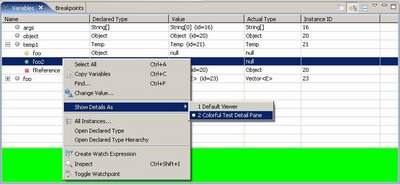
Of course, it can display much more than that. A custom detail pane is defined by implementing org.eclipse.debug.ui.IDetailPane. The pane can contribute any SWT Control, including Composites that contain multiple controls, to the detail pane. When the user makes a selection the custom pane is passed the selection so it can display the information however it wants. The user can use the context menu to choose between the different detail panes available for the current selection.
To contribute a custom detail pane you must use the new extension point org.eclipse.debug.ui.detailPaneFactories. At this extension point you specify a class implementing org.eclipse.debug.ui.IDetailPaneFactory. Each contributed factory will be asked what detail panes that factory can produce for a given selection. A factory can offer different combinations of detail panes depending on the selection. For example, a pane might only be available when 2 or more java variables are selected. To reduce plugin loading, plugins can also add enablement expressions to the extension so that the factory is only instantiated if the selection applies.
We are looking forward to seeing what people can do with this new feature. Leave a comment or send us an e-mail if you create one. In the future we will try to make an example plugin and possibly a short tutorial available.
The first major feature I worked on is adding support for custom detail pane widgets (Bug 75852). This feature allows plugins to contribute new detail panes. The “detail pane” is the area in the variable, expressions and registers view that displays information about the currently selected variable. Up until now, the detail pane could only display text.
Now it can display colours! This custom pane changes background colours depending if the selected element is public/private/etc:
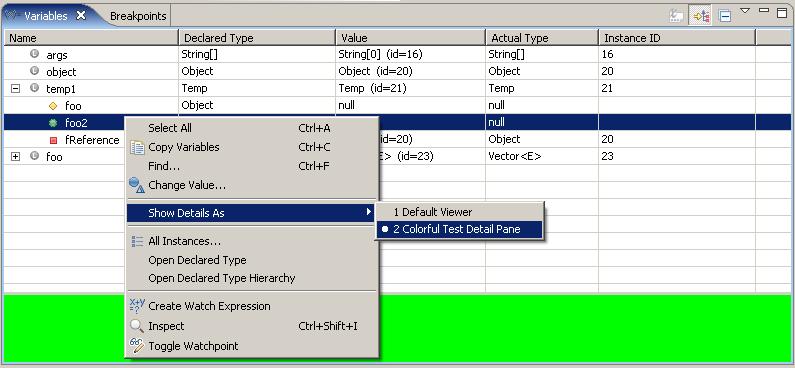
Of course, it can display much more than that. A custom detail pane is defined by implementing org.eclipse.debug.ui.IDetailPane. The pane can contribute any SWT Control, including Composites that contain multiple controls, to the detail pane. When the user makes a selection the custom pane is passed the selection so it can display the information however it wants. The user can use the context menu to choose between the different detail panes available for the current selection.
To contribute a custom detail pane you must use the new extension point org.eclipse.debug.ui.detailPaneFactories. At this extension point you specify a class implementing org.eclipse.debug.ui.IDetailPaneFactory. Each contributed factory will be asked what detail panes that factory can produce for a given selection. A factory can offer different combinations of detail panes depending on the selection. For example, a pane might only be available when 2 or more java variables are selected. To reduce plugin loading, plugins can also add enablement expressions to the extension so that the factory is only instantiated if the selection applies.
We are looking forward to seeing what people can do with this new feature. Leave a comment or send us an e-mail if you create one. In the future we will try to make an example plugin and possibly a short tutorial available.
Tuesday, January 09, 2007
All About Perspective
In line with the changes to the launching framework (retargetting launch delegates, etc), we thought it would be a good idea if we could also fit the 'new way' of launching into the existing perspective switching way of things.
We felt that with such fine control (now) over how and what does the launching, it would be a nice addition to extend that notion to perspective settings. For example, consider you have two profilers that both launch a Java application with profile options. Traditionally this would have led to perspective switching based on which-ever launch delegate was chosen in the end, leaving the user no control over what would be switched to based on what did the launching.
Now however, the user can select down to the launch delegate level to specify launch perspective settings. Changes to these setting can be applied on the Perspective preference page as before, with the only notable change being to the launchers tree (see screen shot).
 This new page design also allows multiple perspectives to be set at one time, i.e. you can multi-select items in the tree and set perspectives for common modes to all delegates/types in the selection. You can also over-write common perspective settings for launch delegates of a particular type by changing the perspective settings of that type.
This new hotness is available in builds >= Jan 9 2006
We felt that with such fine control (now) over how and what does the launching, it would be a nice addition to extend that notion to perspective settings. For example, consider you have two profilers that both launch a Java application with profile options. Traditionally this would have led to perspective switching based on which-ever launch delegate was chosen in the end, leaving the user no control over what would be switched to based on what did the launching.
Now however, the user can select down to the launch delegate level to specify launch perspective settings. Changes to these setting can be applied on the Perspective preference page as before, with the only notable change being to the launchers tree (see screen shot).
 This new page design also allows multiple perspectives to be set at one time, i.e. you can multi-select items in the tree and set perspectives for common modes to all delegates/types in the selection. You can also over-write common perspective settings for launch delegates of a particular type by changing the perspective settings of that type.
This new hotness is available in builds >= Jan 9 2006
Subscribe to:
Posts (Atom)